
Ways to run Orca
Local desktop, SSH hosts, self-hosted Orca servers, and on-demand per-workspace VMs — pick the right compute for each task.
Orca is not locked to your laptop. Every worktree runs somewhere — on the machine in front of you, on a box you already own, on a shared always-on server, or on a fresh cloud VM spun up for that one workspace.
This page is the map. Deep dives live on the linked pages.
At a glance
| Mode | Where files and agents live | Who owns the machine | Best for |
|---|---|---|---|
| Local | Your desktop | You | Day-to-day coding, fast iteration |
| SSH target | A remote host you connect to over SSH | You (or your team) | Dev boxes, GPU hosts, always-on VPS |
| Remote Orca Server | A machine running orca serve | You (or your team) | Shared runtime, mobile pairing, automation |
| Per-workspace environment | A disposable VM/sandbox per workspace | Your cloud account (BYO provider) | Isolated, ephemeral agent compute |
Orca does not sell managed VPS hosting. Remote modes always use machines and cloud accounts you control.
1. Local desktop
Install Orca, open a project, create worktrees. Agents, terminals, and the browser run on the same machine as the UI.
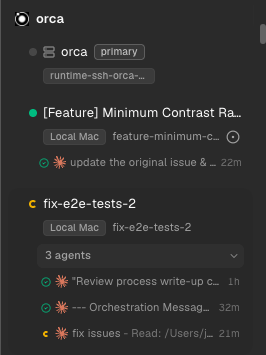
This is the default path for most people. See Your first 3-agent session and Worktrees.
2. SSH targets
Point Orca at any SSH host — a beefier Mac mini, a Linux VPS, a GPU box, a cloud sandbox with SSH. When you create a worktree, pick that host under Run on. Agents and git worktree run on the remote; the editor, diff, and UI stay on your laptop.
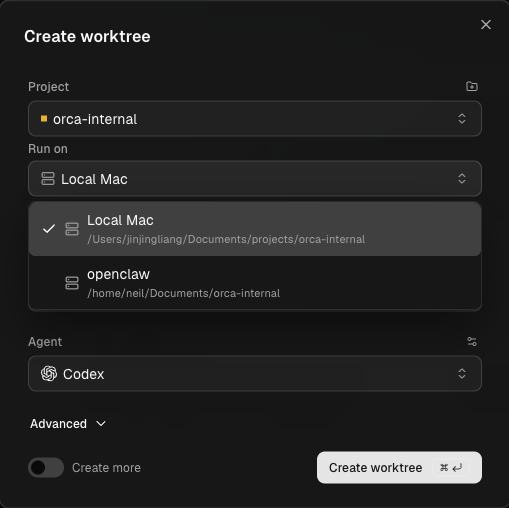
Good fit when: the remote already has your repo, tools, and credentials, and you want one laptop Orca to drive many boxes.
Setup sketch:
- Add the host under Settings → SSH.
- Test the connection (git must be available on the host for repo worktrees).
- Create a worktree and select the SSH target under Run on.
Full detail: SSH worktrees and the recipe Work on a remote machine over SSH.
3. Remote Orca Servers (self-host on a VPS)
Run orca serve on a machine you keep online (home server, cloud VPS, team box). Pair your laptop, browser client, or phone to that runtime. The server owns projects, worktrees, terminals, and agent processes; clients are the UI.
Good fit when:
- You want agents to keep running after your laptop sleeps
- Mobile should reconnect to the same sessions
- Automation or a backend should start sessions on a stable host
orca serve --pairing-address <reachable-ip-or-tailscale-hostname>Then Settings → Remote Orca Servers → Add Server and paste the pairing URL.
Full detail: Remote Orca Servers.
SSH vs Remote Orca Server
| SSH worktrees | Remote Orca Server | |
|---|---|---|
| Runtime owner | Laptop Orca | Remote machine (orca serve) |
| Disconnect | Agents keep running on the host; laptop reattaches | Full session state lives on the server |
| Multi-client | One laptop drives the host | Laptop, web, mobile, and automation can share the same runtime |
| Typical setup | Import SSH config, pick Run on | Install Orca on the VPS, pair with a URL |
4. Per-workspace environments (ephemeral VMs)
Each worktree can boot its own on-demand environment — a cloud sandbox, VM, or local Docker container — from a recipe checked into the repo (orca.yaml + lifecycle scripts). Create spins it up; suspend/resume/destroy tear it down. Orca is a thin wrapper: your provider account, images, and billing stay yours.
Providers people wire today include Vercel Sandbox, Fly, Modal, plain SSH hosts, and local Docker. Connection is either Orca server (recipe starts orca serve and returns a pairing URL) or SSH (recipe returns connection details Orca dials).
Good fit when: you want clean isolation per task, disposable compute, or a standard environment every agent boots into.
Setup sketch:
-
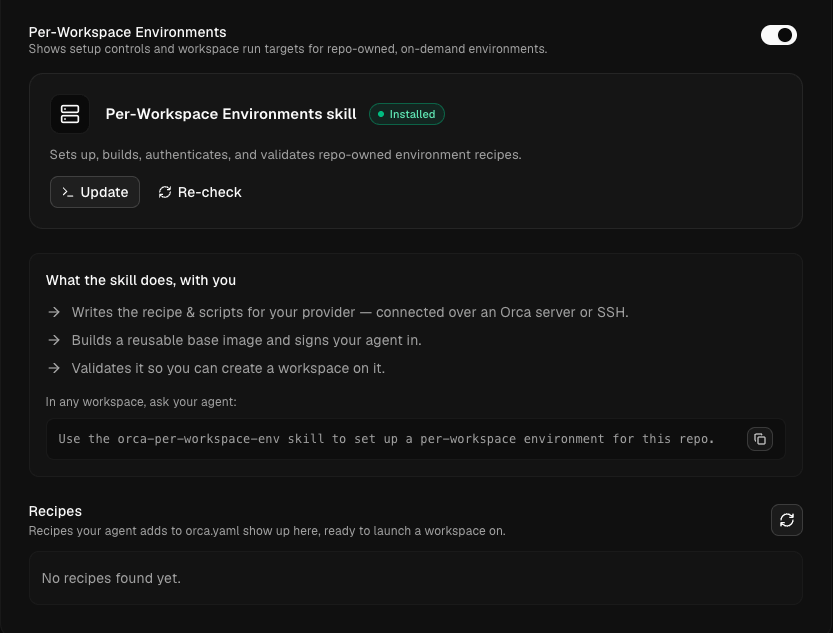
Enable Per-Workspace Environments under Settings → Experimental.
-
Install/update the Per-Workspace Environments skill if needed.
-
In any workspace, ask your agent:
Use the orca-per-workspace-env skill to set up a per-workspace environment for this repo. -
The skill walks prerequisites → base snapshot → agent auth →
orca.yamlrecipe → doctor validation. -
When a recipe appears under Recipes, create a worktree and choose it under Run on.
Recipes only show up for workspace create once the environmentRecipes entry is on the project's primary checkout of orca.yaml (not only a feature branch). Doctor and live provision can still run from any branch while you iterate on scripts.
How to choose
- Stay local if the laptop is fast enough and agents are short-lived.
- SSH if you already have a VPS or dev box and want agents there without installing a second Orca runtime.
- Remote Orca Server if you want one always-on Orca runtime for mobile, browser, and automation.
- Per-workspace environments if each task should get a fresh, recipe-defined sandbox that dies with the worktree.
You can mix modes in one install: local worktrees for quick edits, SSH for a GPU box, and a recipe for CI-like isolation.